
Laser Cut
- Self-Help / Full-Service
- Laser Cut Reminders
- Reminders for Graphics
Self-Help / Full-Service
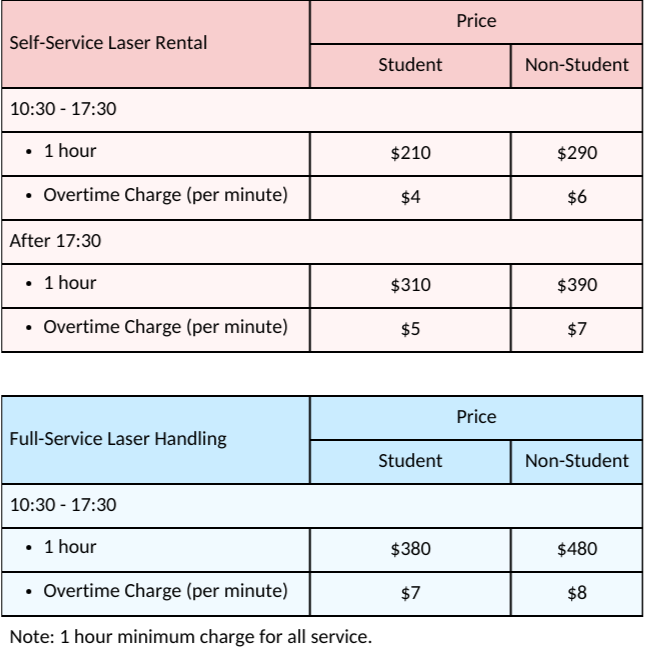
Self-Service Laser Rental and Full-Service Laser Handling
- Laser Cut Reservation: WhatsApp (852) 6323 1350 / (852) 6283 2680
- A minimum of 1 hour is required for all service types.
- Materials are charged separately.
- If you choose the Self-Service Laser Rental, please bring your USB drive containing your documents. Please also bring your computer in case you need to modify your documents.
If you opt for Full-Service Laser Handling, kindly send your documents to our email yanngai38@yahoo.com.hk before proceeding with the laser cutting.
Service Hours
Monday to Saturday: 10:30 – 17:30
Sunday and public holidays: closed
Service hours will be extended during exams. If you have any further queries, please do not hesitate to contact me.
Document Submission Last Call
Monday to Saturday: 17:00 (Please get in touch with us for the individual case)
Laser Cut Reminders
Laser Cut Reminders
- Please send your documents to our email yanngai38@yahoo.com.hk
- Email must include the following information:
- Name of Individual, Company or School Name, etc.
- Contact Phone Number
- Type, Size, Thickness and Quantity of Materials
- Please prepare different files based on the different materials being cut. 如切割材料不同,請分開文件储存。
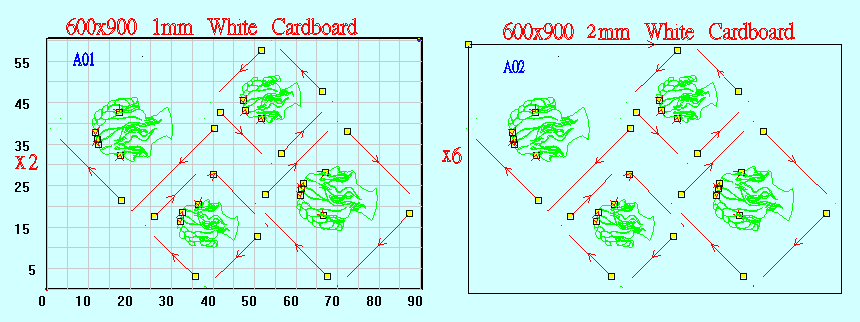
- (a) Layer only: Layer “0”, don’t put anything
Layer only: Layer “cut”- Red Line
Layer only: Layer “engrave”- Green Line
Layer only: Layer “full engrave”- Blue Line
(b) Please note that your file format must be saved in DXF 2004 or Ai 7.0 or Ai 8.0.
(Please note that if the format is Ai 7.0 or Ai 8.0, all lines can only show one color in our machine, so it is better to convert it to DXF 2004 using online software or tell us about color and cutting outline.) - The pricing we quote according to the type, size, thickness, quantity of materials and complexity of the draft.
- We do NOT provide the service of graphics amendment from your files and graphics design.
- For staff laser services, the graphics must be CLEARLY checked and confirmed by both party via Whatsapp 6283-2680 before we start the laser cut. The company does NOT take any responsibilities for any errors or damage of materials during the laser cutting.
* Please note that we do NOT have laser cut service for any foam boards, styrofoam boards, PVC and metal materials.
Reminders for Graphics
Reminders for Graphics
- “units” = mm
- Must be “flattened”
- Layer only: Layer “0”, don’t put anything
Layer only: Layer “cut”- Red Line
Layer only: Layer “engrave”- Green Line
Layer only: Layer “full engrave”- Blue Line - Move to origin “0”0”0”
- Overkill
- PEDIT: join all
- Software: Rhino = Make 2D = only output line
- The largest size of materials for laser cut is 600 x 900 mm. *[Please reserves 10 mm space in each edge of the material size]
- The graphics should put in the upright position.
- Please be aware of the thickness of materials for laser cut.
- If the laser cut file cannot be opened, please revise according to the procedures below:
(1) If the file consists of any texts, please inform us.
(2) Text save outline (For Adobe illustrator Only)- Highlight text box
- “object” →”Create outline”
- Done